第13章:通知・集計の基本形(実務っぽい)📣📊
この章でできるようになること🎯
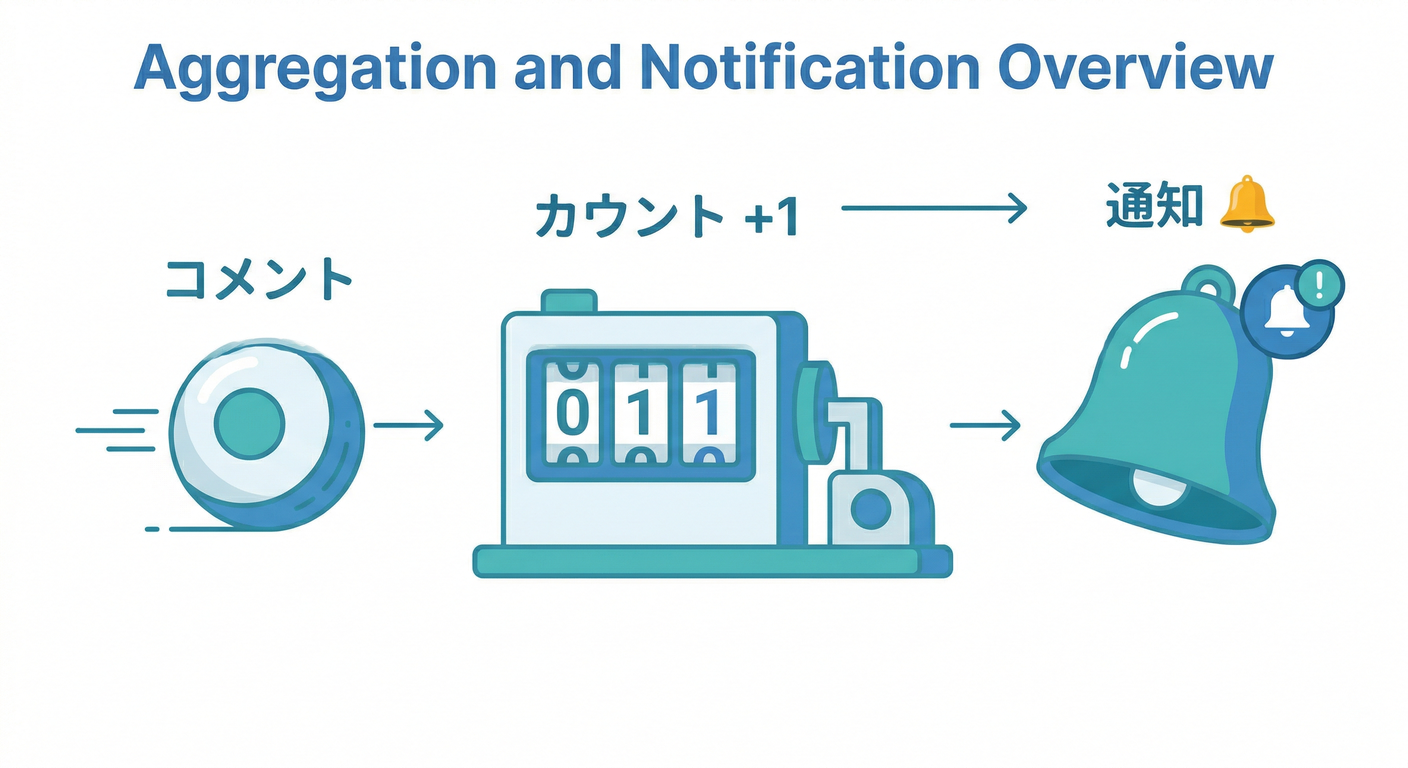
- コメントが追加されたら、親(投稿)の「commentCount」を自動で +1 できる📈
- 「通知用ドキュメント」を作って、フロントで“通知っぽく”表示できる🔔✨
- “たまに2回動く”みたいな現象にビビらず、壊れない作戦(冪等)を入れられる🛡️
1) まず超重要:イベントは「1回とは限らない」⚡🧠
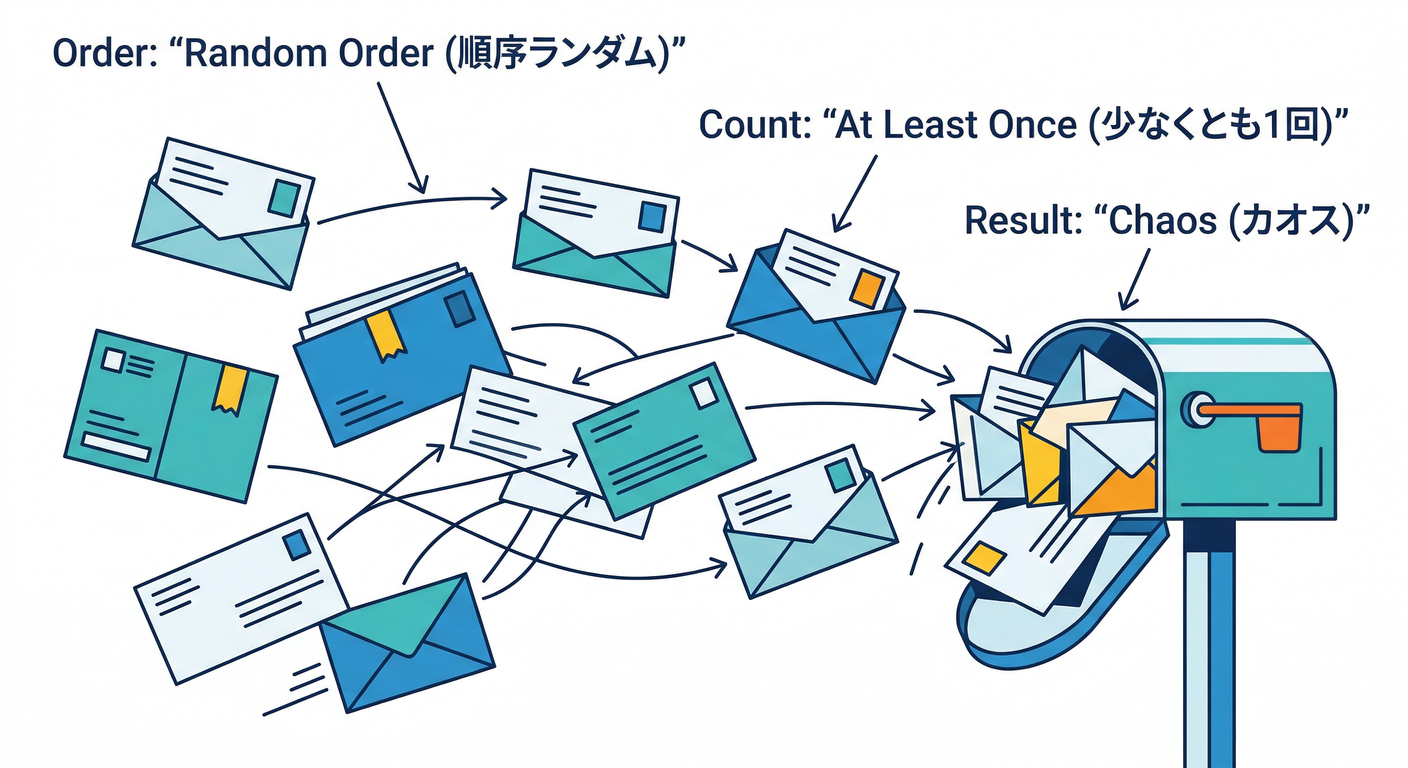
Firestoreトリガー系は、実務的にはこう考えるのが安全です👇
- 順番は保証されない(先に来ると思った方が後から来ることもある)🌀
- **最低1回は実行される(=たまに複数回もあり得る)**📣
- Functions(管理者権限の処理)は、Security Rulesの制御を受けない🔓(=強い、けど慎重に!)
この前提があるので、「commentCount +1」みたいな集計は 冪等(同じイベントが来ても結果が壊れない) に寄せるのが勝ち筋です🏆✨ (Google Cloud Documentation)
2) 今日の題材:投稿+コメント+通知(いちばん王道)🏗️🧩
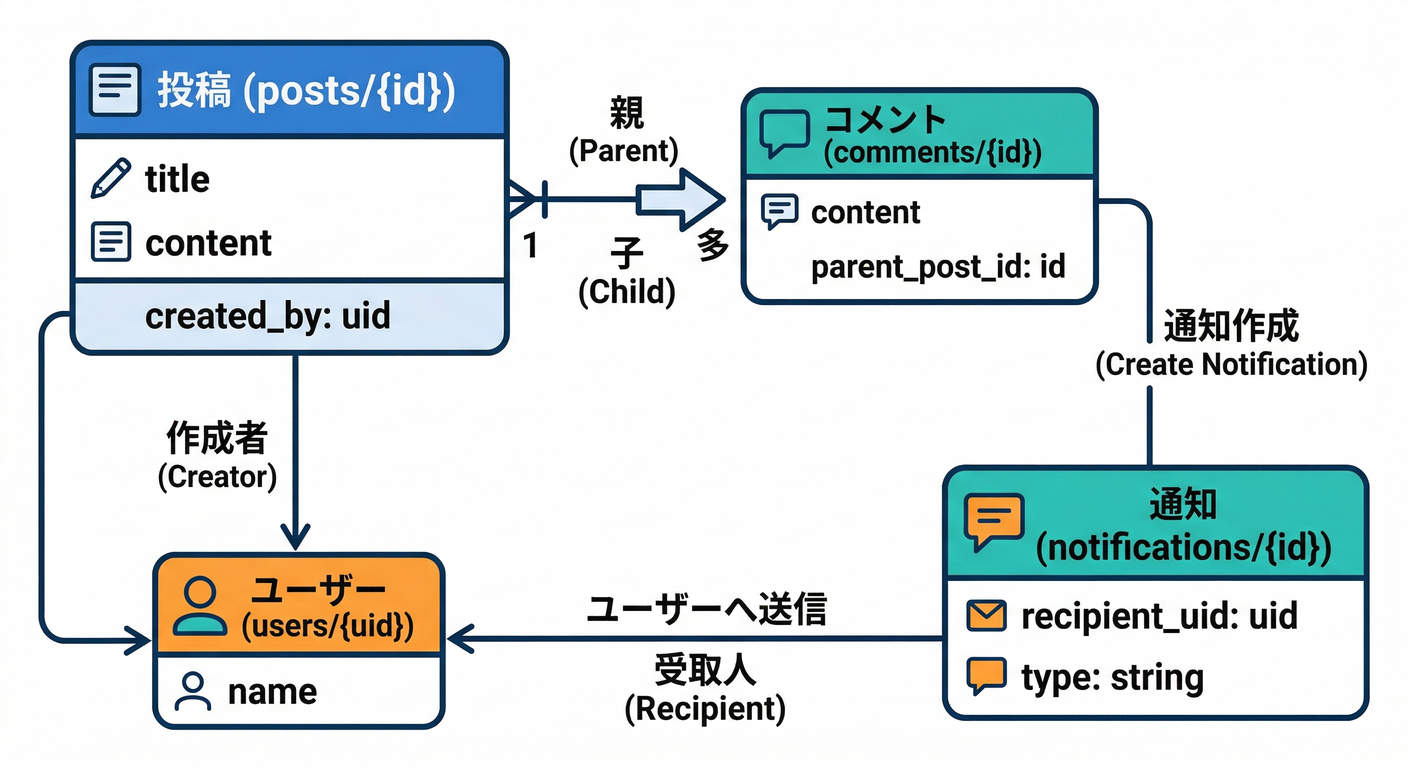
データの雰囲気はこんな感じでOKです👇
-
posts/{postId}
- commentCount: number(集計)
- ownerUid: string(通知先を決める)
- lastCommentAt: timestamp(更新感)
-
posts/{postId}/comments/{commentId}
- text: string
- authorUid: string
- createdAt: timestamp
-
users/{uid}/notifications/{notificationId}
- type: "comment"
- postId, commentId
- message: string(短く)
- createdAt: timestamp
- read: boolean
ポイント💡
- コメント一覧を表示するたびに数えるのは、読み取りが増えて地味に重い😵
- だから、**“集計値を持つ”**のが現実的(投稿一覧で commentCount をサッと出せる)🚀
3) まずは最短の基本形:atomic incrementでカウンタ更新📈✨
Firestoreには「いまの値に +1」を安全にやる仕組み(increment)があるので、まずはこれが基本です🧠 ただし、**“同じイベントが複数回来たら +2 になり得る”**のが落とし穴なので、次でガードを入れます🧯
(トランザクション自体は「全部成功 or 全部失敗」の原子性があり、競合すると再実行もされます) (Firebase)
4) 実務形:冪等ガードつき「commentCount更新+通知作成」🛡️🔔
9) つまずきポイント集(先に潰す)🧯😆
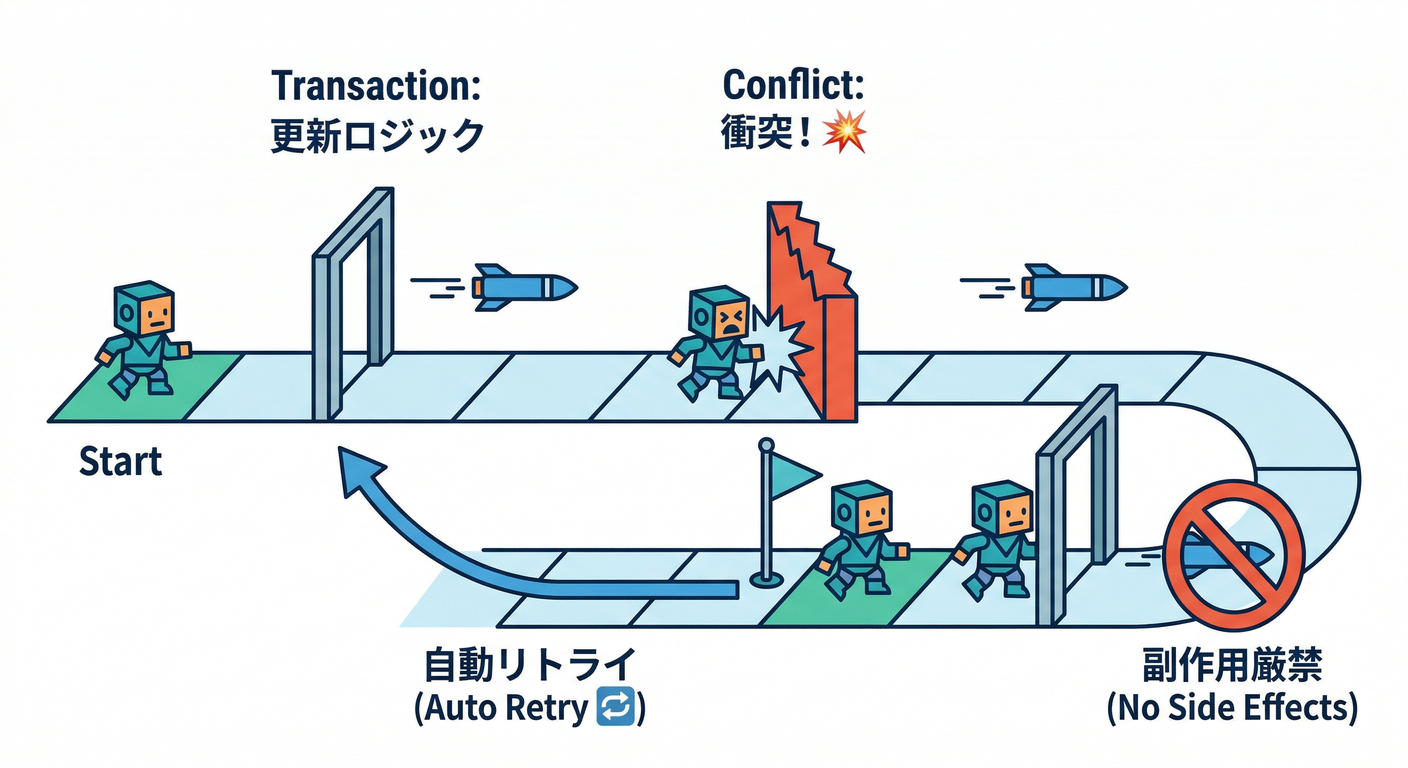
ここからが本番です😆✨ 考え方はシンプル👇
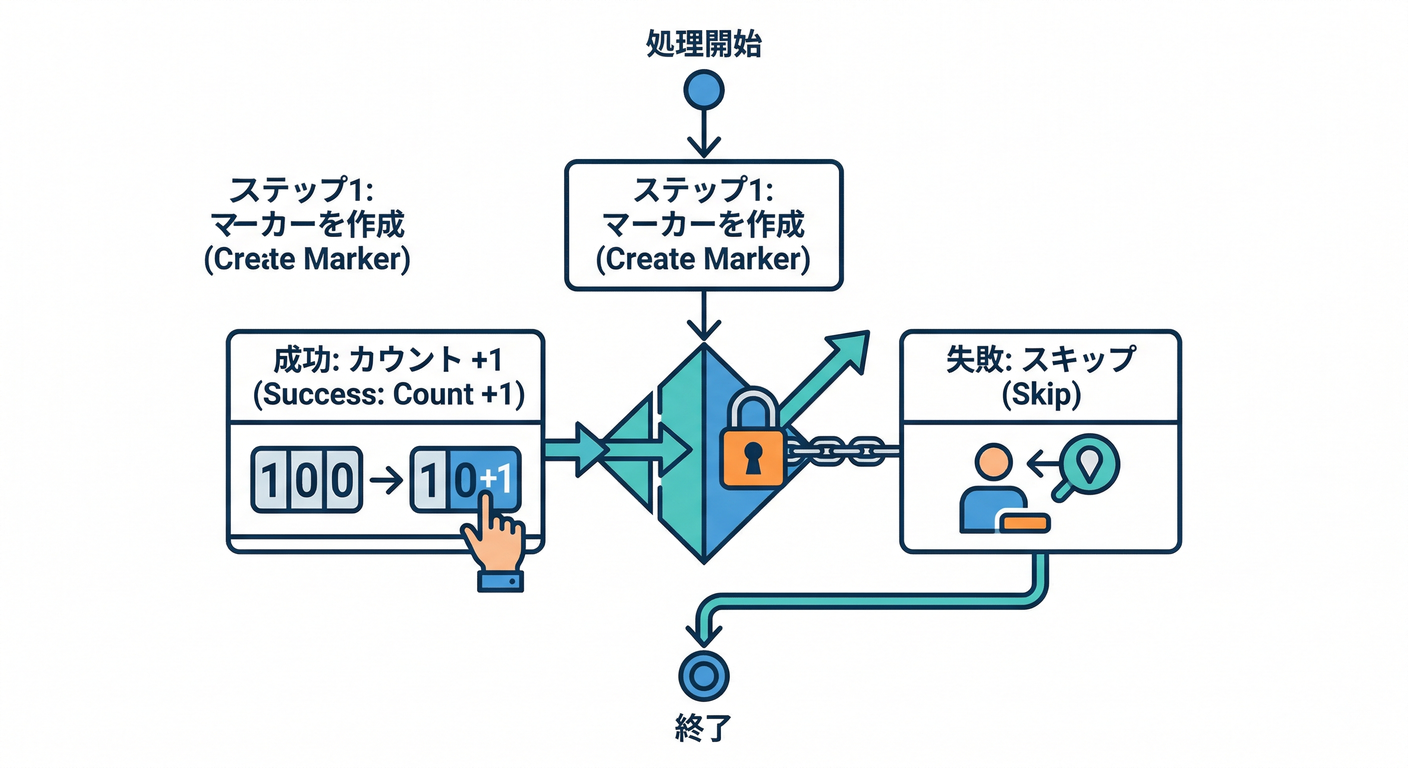
✅ “このコメントIDは処理済み” の印(マーカー)を 作れたときだけ カウンタを +1
- もし同じイベントがもう一回来ても、マーカー作成が失敗して 何も起きない(=壊れない)💪
実装(TypeScript / 2nd gen Firestore trigger)⚙️
- Node.js は 20/22 が現役扱いで、Functionsでもこのあたりが主流です (Firebase)
- Pythonを使う場合も 3.10〜3.13(デフォルト3.13) が案内されています (Firebase)
import { initializeApp } from "firebase-admin/app";
import { getFirestore, FieldValue } from "firebase-admin/firestore";
import { onDocumentCreated, onDocumentDeleted } from "firebase-functions/v2/firestore";
import * as logger from "firebase-functions/logger";

initializeApp();
const db = getFirestore();

function isAlreadyExistsError(err: unknown): boolean {
  // Firestore/Grpc系で「すでに存在」= code 6 (ALREADY_EXISTS) が来ることが多い
  return typeof err === "object" && err !== null && "code" in err && (err as any).code === 6;
}

/**
 * コメント作成 → commentCount +1 & 通知ドキュメント作成
 */
export const onCommentCreated = onDocumentCreated(
  "posts/{postId}/comments/{commentId}",
  async (event) => {
    const { postId, commentId } = event.params;
    const comment = event.data?.data();
    const commentText = (comment?.text ?? "").toString();

    const postRef = db.doc(`posts/${postId}`);
    const markerRef = db.doc(`posts/${postId}/_markers/commentCreated/${commentId}`);

    try {
      await db.runTransaction(async (tx) => {
        // 投稿を読んで ownerUid を取る(通知先)
        const postSnap = await tx.get(postRef);
        if (!postSnap.exists) {
          logger.warn("post not found, skip", { postId, commentId });
          return;
        }
        const ownerUid = postSnap.data()?.ownerUid as string | undefined;
        if (!ownerUid) {
          logger.warn("ownerUid missing, skip notify", { postId, commentId });
        }

        // ここが肝:マーカーを「create」できた人だけが勝つ(冪等ガード)
        tx.create(markerRef, {
          createdAt: FieldValue.serverTimestamp(),
          kind: "commentCreated",
        });

        // 集計更新(+1)&更新感
        tx.update(postRef, {
          commentCount: FieldValue.increment(1),
          lastCommentAt: FieldValue.serverTimestamp(),
        });

        // 通知(同一IDで作ると重複しにくい)
        if (ownerUid) {
          const notifRef = db.doc(`users/${ownerUid}/notifications/${commentId}`);
          const message =
            commentText.length > 60 ? commentText.slice(0, 60) + "…" : commentText;

          tx.set(
            notifRef,
            {
              type: "comment",
              postId,
              commentId,
              message,
              createdAt: FieldValue.serverTimestamp(),
              read: false,
            },
            { merge: true }
          );
        }
      });

      logger.info("commentCreated processed", { postId, commentId });
    } catch (err) {
      if (isAlreadyExistsError(err)) {
        // 同じコメントIDで2回目が来た(=すでに処理済み)ので無視してOK
        logger.info("duplicate event ignored", { postId, commentId });
        return;
      }
      logger.error("commentCreated failed", err);
      throw err;
    }
  }
);

/**
 * コメント削除 → commentCount -1(下限0)だけやる例
 * ※削除も複数回あり得るので、同じノリでマーカーを切る
 */
export const onCommentDeleted = onDocumentDeleted(
  "posts/{postId}/comments/{commentId}",
  async (event) => {
    const { postId, commentId } = event.params;

    const postRef = db.doc(`posts/${postId}`);
    const markerRef = db.doc(`posts/${postId}/_markers/commentDeleted/${commentId}`);

    try {
      await db.runTransaction(async (tx) => {
        const postSnap = await tx.get(postRef);
        if (!postSnap.exists) return;

        tx.create(markerRef, {
          createdAt: FieldValue.serverTimestamp(),
          kind: "commentDeleted",
        });

        const current = Number(postSnap.data()?.commentCount ?? 0);
        const next = Math.max(0, current - 1);

        tx.update(postRef, {
          commentCount: next,
        });
      });

      logger.info("commentDeleted processed", { postId, commentId });
    } catch (err) {
      if (isAlreadyExistsError(err)) {
        logger.info("duplicate delete ignored", { postId, commentId });
        return;
      }
      logger.error("commentDeleted failed", err);
      throw err;
    }
  }
);
ここで学べること(超大事)🧠✨
- トランザクションは競合すると内部で再実行されることがあるので、副作用(外部API叩く等)を中に入れすぎないのが安全🧯 (Firebase)
- “イベントが複数回来ても壊れない”を作るには、createでマーカーが分かりやすくて強い🛡️
- Functionsは強い権限で動くので、書き込み先や入力値の扱いは丁寧に(ルール外で動く)🔒 (Google Cloud Documentation)
5) 「通知」って結局なに?まずは“通知ドキュメント”でOK🔔🙂
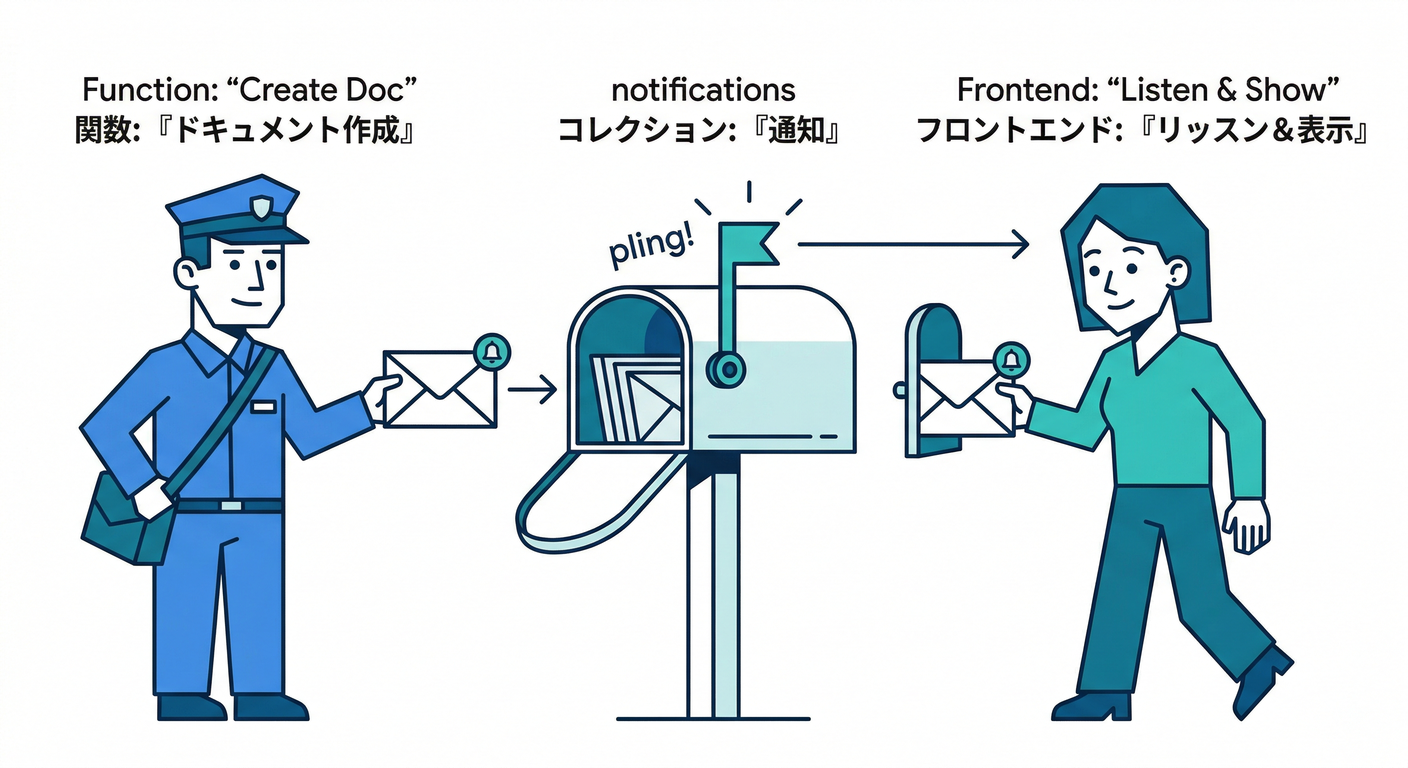
いきなりPush通知やメールに行くと難度が跳ねます😵 まずはこの章では👇
- Functionsが「通知ドキュメント」を作る
- フロントがそれを購読して “🔔通知が来た感” を出す
これだけで、アプリ体験が一気に“それっぽく”なります✨📱
(次の段階で、Slack通知やFCM通知に広げるのが自然です📨)
6) 集計が増えてきた時の壁:1つのドキュメントに書き込み集中😵💫
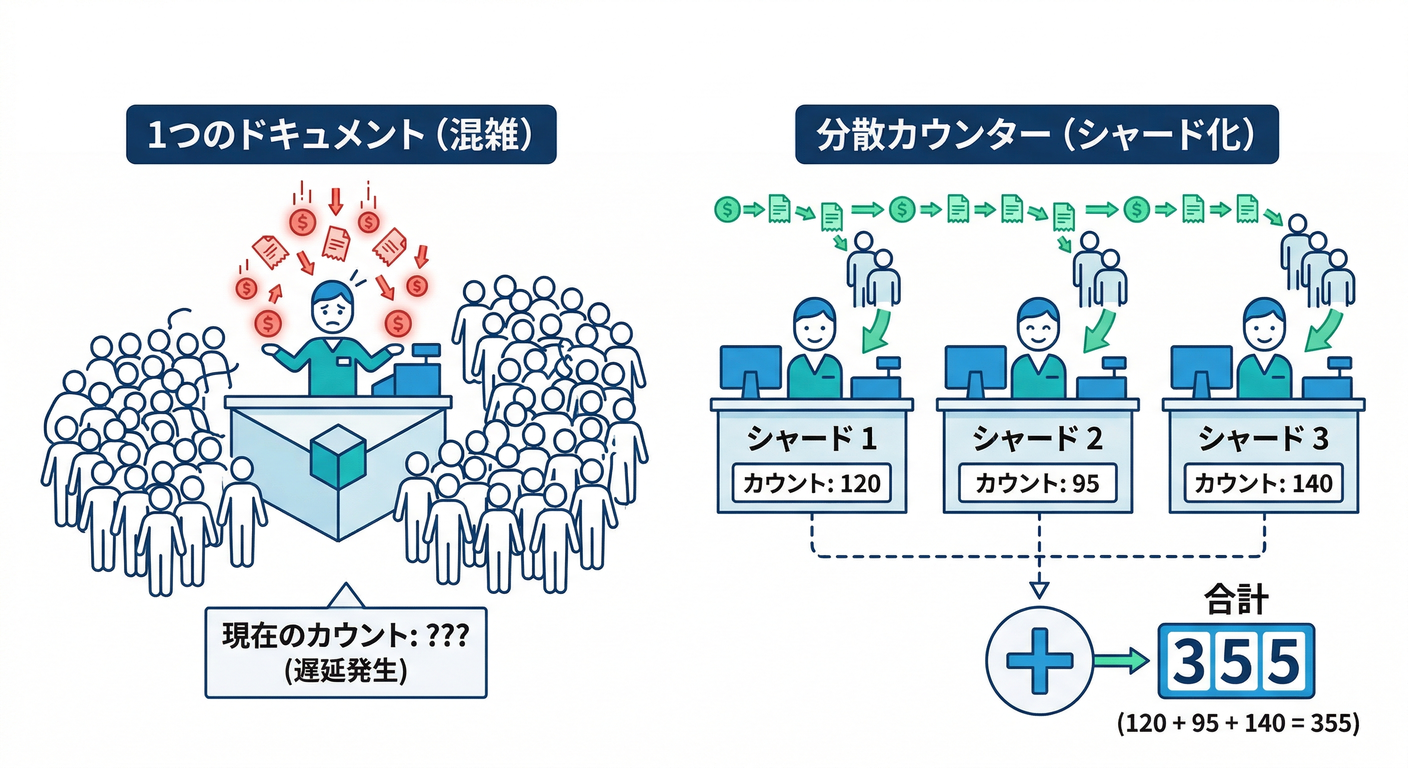
commentCountを posts/{postId} に持つのは王道なんですが、人気投稿にコメントが集中すると👇
- 同じドキュメントに更新が集中して “取り合い” が発生しやすくなる🌀
こういう時の逃げ道が 分散カウンタ(shards) です💡 「1つのカウンタを、複数の小さなカウンタに分けて足し算する」イメージ🎯 公式の解説もこの方向です (Firebase)
目安の考え方🧭
- 普通のアプリ → まずは単一 commentCount でOK🙆
- バズって更新が集中 → 分散カウンタへ(シャード数で耐久UP)🔥 (Firebase)
7) AIの絡め方:設計レビュー&事故予防に使うのが最強🤖🧰
この章のAIは「文章生成」より、設計と運用事故の予防に刺さります💥
7-1) Gemini CLI拡張で“人間が迷う部分”を減らす🧭
Firebase向けの Gemini CLI 拡張(公式)が案内されています 例:こんなお願いが強い👇
- 「このトリガー設計、無限ループの可能性ある?」🌀
- 「冪等ガード、もっと簡単にできる?」🛡️
- 「通知ドキュメントの項目、足りないものある?」🔔
- 「分散カウンタに移行する判断ポイントを整理して」📈
7-2) MCP serverで“Firebaseの状況参照”をAIに手伝わせる🧩
Firebaseの MCP server は、AI支援開発(エージェント/CLI)側から扱える前提で案内があります (Firebase) 「今どんな設定だっけ?」を調べる系の作業が速くなるので、教材としても相性よいです🚀
8) ミニ課題🎒🔥(この章のゴール確認)
やること✅
- posts/{postId} を1つ作る(commentCount: 0, ownerUid: 自分のUID)🙂
- posts/{postId}/comments にドキュメントを追加✍️
- posts/{postId}.commentCount が +1 になるのを確認📈
- users/{ownerUid}/notifications/{commentId} が作られているのを確認🔔
- 同じコメントIDで“もし重複実行が起きても”増えすぎない設計になってるか、コードを眺めて説明🛡️
できたら勝ち🏆
- 「イベントは複数回来るかも」でも壊れない理由を、マーカーcreateで説明できる✨ (Google Cloud Documentation)
9) つまずきポイント集(先に潰す)🧯😆
- commentCount がマイナスになる → 下限0でガード(例コードの通り)✅
- 通知が増えすぎる → notificationId を commentId にして“同じものは上書き”にするのが簡単🙂
- 外部API送信(Slack等)をトランザクション内でやりたくなる → トランザクションは再実行され得るので、外部送信は分離した方が安全🧯 (Firebase)
10) 次章につながる視点🔜⏰
この章で「通知・集計」の型が入ったので、次は👇
- **定期実行(毎朝レポート)**で“集計の活用”が一気に実務っぽくなる⏰
- さらに運用(ログ・アラート)へ行くと、“怖くない本番”に近づきます🧯✨
おまけ:別言語の位置づけメモ🧩
- Pythonは Functions でも 3.10〜3.13(デフォルト3.13) が案内されています (Firebase)
- C#/.NETは、Firebase Functionsの主軸というより「周辺(Cloud Run functions等のHTTPサービス)」として組むのが現実的で、少なくとも .NET 8 のサポートは公式に言及があります (Google Cloud Documentation)
次は「この章のコードを、あなたの“メモ+画像+AI整形”アプリ寄りのスキーマ」に寄せた版(posts→memos、comments→replies みたいな置き換え)もすぐ作れますよ😆📘✨