第20章:整合性を“サーバー側”で守る(Functions / Cloud Run / AI)⚙️🤖
この章は「アプリが大きくなっても壊れない仕組み」を作る回です💪✨ Firestoreは便利だけど、クライアント(ブラウザ)を信用しすぎると事故りやすいんだよね…😇💥 だから、整合性(つじつま)をサーバー側で守る設計にします!
1) まず“整合性”ってなに?🤔🧠
たとえば「記事 / コメント」の世界で、こういう“ルール”を守りたい👇
posts/{postId}.commentCountは コメント数と一致していてほしい📌posts/{postId}.lastCommentAtは 最新コメント時刻であってほしい⏰- 「いいね数」や「ランキング」の値が 改ざんされないでほしい🔒
- AIが生成した内容が保存されるなら、誰が・いつ・何を生成したか追跡したい🕵️♂️🧾
でもクライアントは… DevToolsでリクエスト改造できるので 「commentCountを9999にする」 とか普通にできちゃう🥲🪛

2) サーバー側で守る方法は3つ(迷ったらこれ)🧭✨
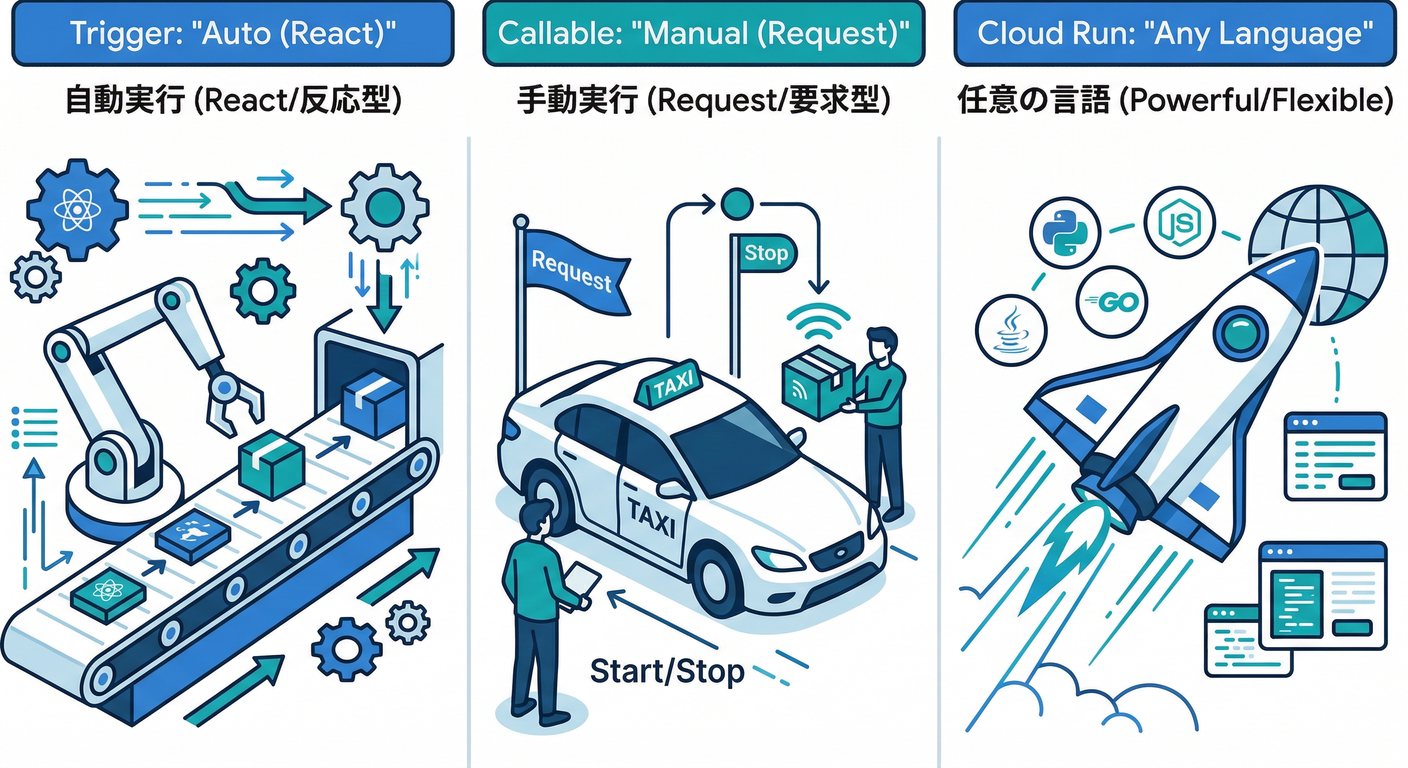
| 方式 | 向いてること | ざっくり |
|---|---|---|
| Firestoreトリガー(Functions 2nd gen) | “誰かが書いたら自動で整える” | コメント追加→コメント数更新、ログ書き込み等 |
| HTTPS関数(Callable/HTTP) | “操作自体をサーバーに寄せる” | 「コメント追加」そのものをサーバー経由にする |
| Cloud Run functions | “.NETなど別言語でやりたい” | Firebase Functionsの外で、でもサーバレスで |
なお、Cloud Functions for Firebase(2nd gen)は Cloud Run と Eventarc を使う仕組みです。(Firebase)
3) 2026-02-16時点:ランタイムの最新メモ🆕🧩
- Cloud Functions for Firebase のランタイムは nodejs22 / nodejs20 / nodejs18(非推奨)、Pythonは python310 / python311 が選べます。(Google Cloud Documentation)
- Cloud Run functions 側は .NET 8(ほか Java/Node/Python/Go/PHP/Ruby など)を含むランタイムが用意されています。(Google Cloud Documentation)
4) 実戦:コメント追加→コメント数を自動更新する(Firestoreトリガー)📝➡️🔁
ゴール🎯
posts/{postId}/comments/{commentId} が作られたら…
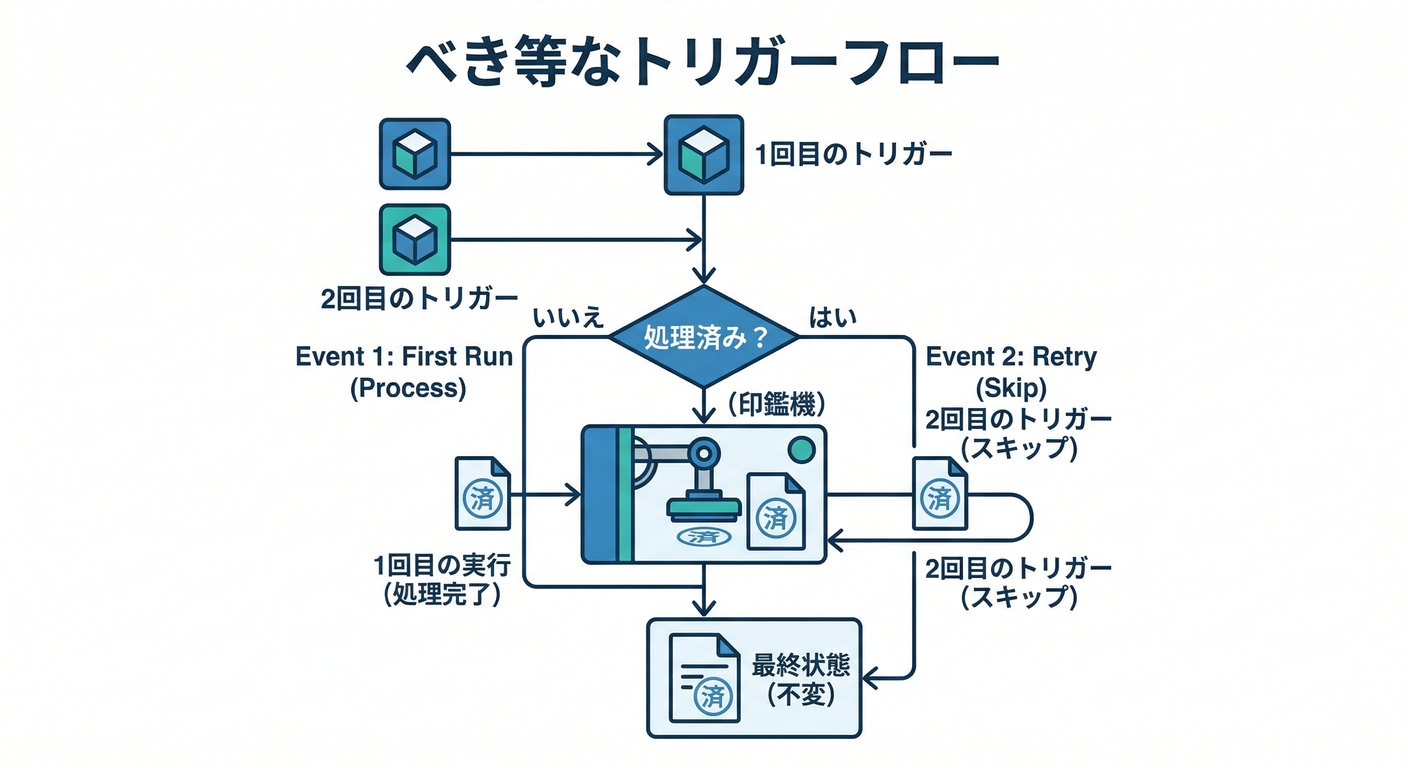
posts/{postId}.commentCountを+1posts/{postId}.lastCommentAtを更新- 二重実行されても壊れない(べき等) にする✅
Firestoreトリガーは 少なくとも1回以上配送され、同じイベントで複数回呼ばれる可能性があるので、べき等性が超重要です⚠️(Firebase)
手を動かす①:関数の“設計メモ”を書く📝🧠
-
コメントドキュメントに
countedAtを持たせる(最初は未設定) -
関数側でトランザクションを使って👇をまとめてやる
- コメントが まだカウントされてない なら
- コメントに
countedAtを付ける - 投稿の
commentCountを+1してlastCommentAt更新
-
すでに
countedAtがあるなら 何もしないで終了(二重実行でも安全🛡️)
これなら「同じイベントが2回届いた」でも、2回目はスキップできるよ😄✨
手を動かす②:TypeScript(Node.js 22)で実装する🧱✨
(例:functions/src/index.ts)
import { onDocumentCreated } from "firebase-functions/v2/firestore";
import { initializeApp } from "firebase-admin/app";
import { getFirestore, FieldValue } from "firebase-admin/firestore";

initializeApp();
const db = getFirestore();

/**
 * posts/{postId}/comments/{commentId} が作成されたら、
 * posts/{postId} の commentCount / lastCommentAt を更新する
 */
export const onCommentCreated = onDocumentCreated(
  "posts/{postId}/comments/{commentId}",
  async (event) => {
    const postId = event.params.postId;
    const commentId = event.params.commentId;

    const commentRef = db.doc(`posts/${postId}/comments/${commentId}`);
    const postRef = db.doc(`posts/${postId}`);

    await db.runTransaction(async (tx) => {
      const commentSnap = await tx.get(commentRef);

      // 念のため(通常は存在するはず)
      if (!commentSnap.exists) return;

      // べき等性:すでに処理済みなら何もしない
      const countedAt = commentSnap.get("countedAt");
      if (countedAt) return;

      // 1) コメント側に「処理済み印」を付ける
      tx.update(commentRef, {
        countedAt: FieldValue.serverTimestamp(),
      });

      // 2) 親(posts)側の集計を更新
      tx.set(
        postRef,
        {
          commentCount: FieldValue.increment(1),
          lastCommentAt: FieldValue.serverTimestamp(),
        },
        { merge: true }
      );
    });
  }
);
💡ポイント
event.paramsにワイルドカードの値が入ります({postId}など)(Firebase)- Firestoreトリガーは順序保証がない&複数回実行もあり得るので、「処理済み印」方式がかなり効きます🧷(Firebase)
手を動かす③:デプロイ(Windows / PowerShell例)🚀🪟
firebase deploy --only functions
5) 重要:クライアントに“集計フィールド”を書かせない🔒✋
整合性を守るなら、最低ラインとして👇は徹底したいです🙂
- クライアント:
commentsだけ書ける(またはサーバー経由にする) - サーバー:
commentCountやlastCommentAtを更新する
そして大事な性質:
 Cloud Functions での読み書きは Security Rulesで制御されない(管理権限で触れる) ので、サーバー側で“最後の砦”になれます🛡️(Firebase)
6) AIも絡める:AI生成ログ(監査)を残す🧾🤖
AIの出力って、あとでこうなるからね👇😇
- 「誰がこの文章作ったの?」
- 「その要約、いつのモデル?」
- 「炎上した…どのプロンプト?」🔥
まずは最小ログ設計(例)📚
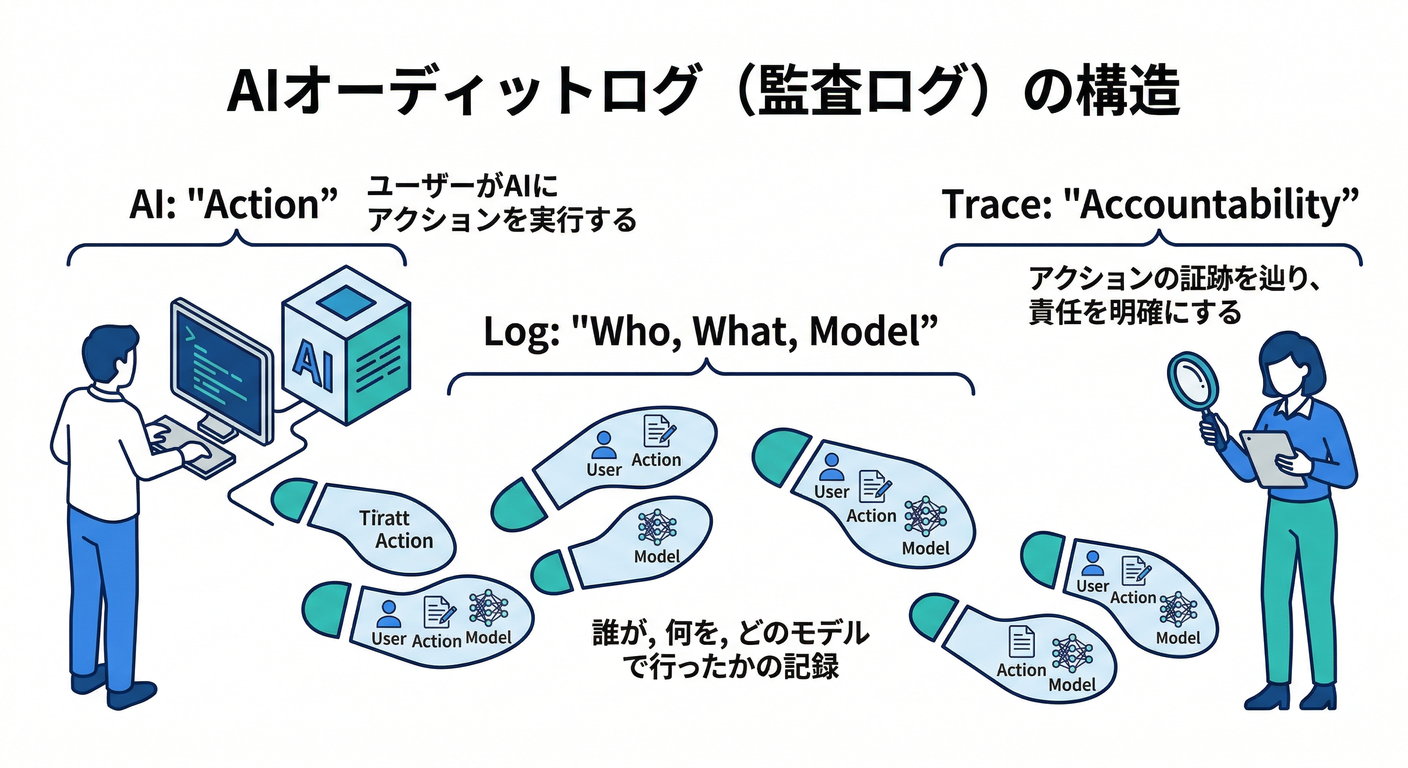
aiLogs/{logId} にこんな形👇
userId(誰が)action(例:summarizePost)model(モデル名)promptHash(プロンプト全文は保存しない方針もアリ)inputRef(対象のpostIdなど)createdAt
さらに、Firebase AI Logic は ユーザーあたりのレート制限(例:デフォルト100 RPM) が明記されています。(Firebase) なので、ログ設計と一緒に「呼び出し回数が増えた時どうする?」も考えやすいよ📈🧠
監査ログ(Cloud側の公式ログ)も使える👀
Firebase AI Logic には Cloud Audit Logs ベースの監査ログがあり、Data Accessログは明示的に有効化が必要です。(Firebase)
7) ミニ課題🎒✨「AI生成結果の保存+監査ログ」を作ろう
お題📝

- AIが生成した「記事要約」を
posts/{postId}.aiSummaryに保存(サーバー側で実施) - 同時に
aiLogsに監査ログを1件書く
条件✅
aiSummaryはクライアントから直接書けない想定(サーバーで書く)aiLogsにはmodel / promptHash / userId / createdAtを入れる- “同じ要求がリトライされても二重保存しない” 工夫を1つ入れる(今回の
countedAt方式みたいに🧷)
8) AIで爆速:Antigravity / Gemini CLI の使いどころ🤖⚡
- GoogleのAntigravityは「エージェントが計画→実装→調査」まで回す思想の開発環境として説明されています(Mission Control的)。(Google Codelabs)
- Gemini CLIはターミナルで動くオープンソースAIエージェントで、ReActループやMCPサーバー連携が紹介されています。(Google for Developers)
そのままコピペ用プロンプト📎
- 「このFirestoreトリガー関数を“べき等”にして。二重実行パターンも洗い出して」
- 「aiLogs設計を、個人情報・コスト・監査の観点でレビューして」
- 「nodejs22のFirebase Functionsで、onDocumentCreatedのコード雛形を生成して」
9) チェック✅(この章の合格ライン🎉)
- クライアント改ざんがあっても、集計が壊れないイメージがある🛡️
- トリガーが複数回動いても二重カウントしない(べき等)✅(Firebase)
- AI生成の結果を「あとで追跡できる」ログ設計ができた🧾(Firebase)
- Node/Python/.NETの置き場所(Functions vs Cloud Run functions)の整理ができた🧭(Google Cloud Documentation)
次に進むなら、超おすすめは「第12章の分散カウンタ」と、この章を合体させて 「アクセスが増えても死なない集計」に仕上げることです🥇🔥