第16章:“うざくならない”制御(まとめる・間引く・寿命を付ける)😇⏳
この章のゴールはシンプルです👇 **「通知の価値は落とさず、通知の回数だけ賢く減らす」**を実装します📣✨
読む:通知が嫌われる3大パターンと、対抗策🧯
通知が“うざい”と言われるのは、だいたいこの3つです👇
- **連投(同じ種類が短時間でドカドカ)**😵💫
- 届くのが遅い(もう価値がない)⌛
- **同じ内容が何度も出てくる(古いのが残る)**🔁
そこで、制御のツマミ(レバー)を3つ使います👇
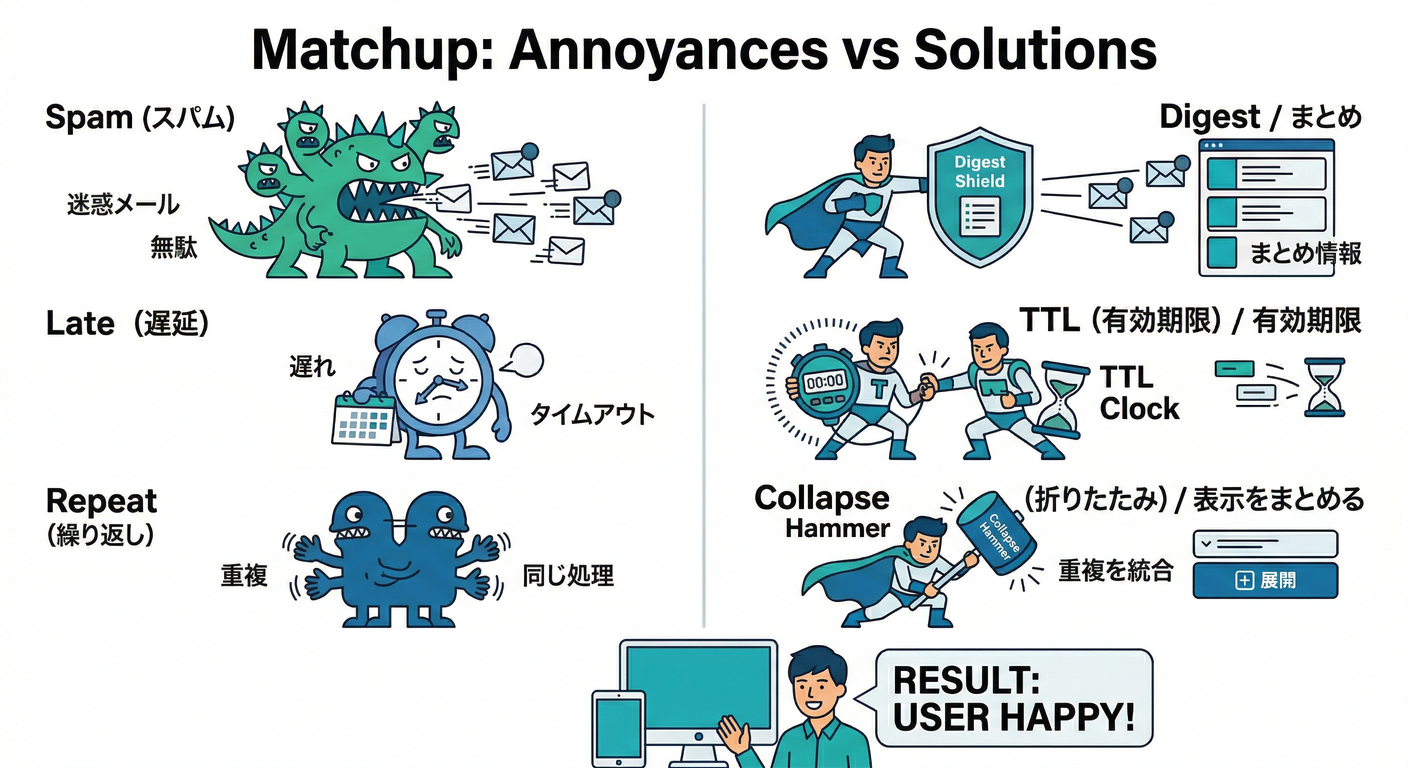
① まとめる(Digest)🧺
「2分で5件コメント」みたいなとき、1通にまとめて 「新着コメント5件!」だけ送るやつです📬✨
② 間引く(Cooldown / Rate limit)🪓
「1ユーザーにつき、同タイプ通知は最短○分おき」みたいに、送れる頻度に上限を作ります😇
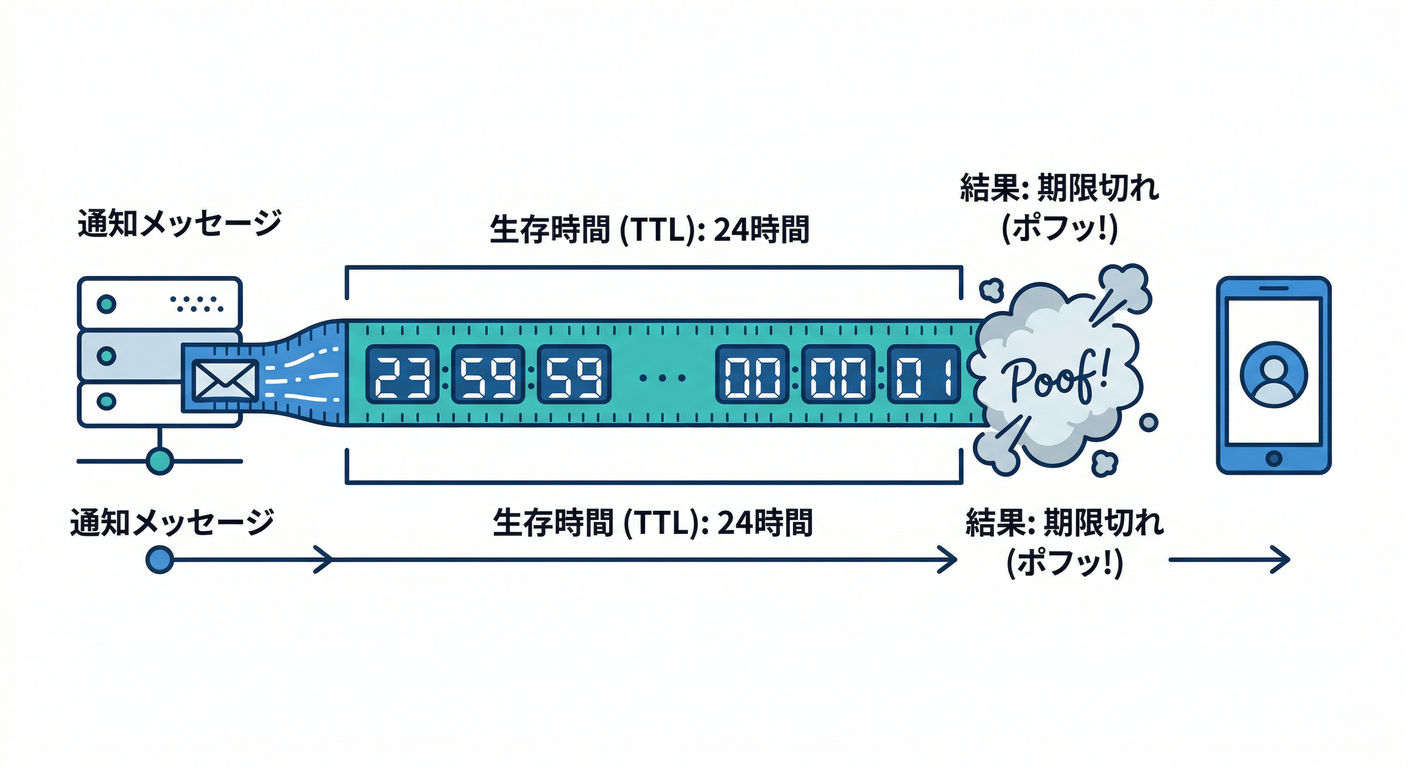
③ 寿命を付ける(TTL)⏰
通知は“鮮度が命”。期限切れなら届かないようにします。
FCMはメッセージの保持期間(TTL)を設定でき、デフォルトは最大4週間です(ただし使いどころで短くするのが正義)(Firebase)
Web Pushは webpush.headers.TTL、iOSは apns-expiration、Androidは android.ttl などで期限を付けられます(Firebase)
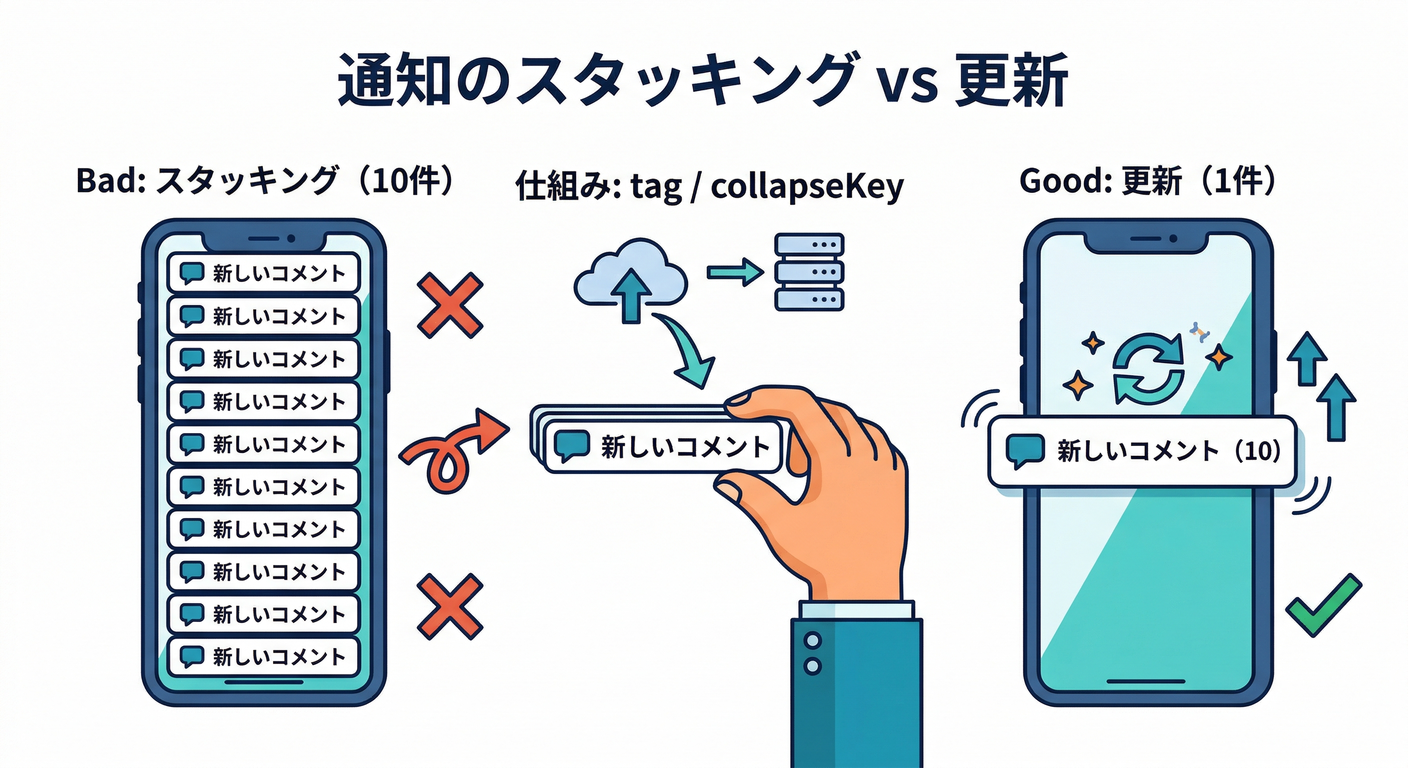
“上書き”でさらに静かにする(地味に効く)🪄
「まとめる・間引く」と相性バツグンなのが **上書き(置き換え)**です。
Android:collapseKey で「最後の1通だけ残す」📱
同じ collapseKey の通知は、溜め込まず“最新だけ”に寄せられます。
しかも 同時に保持される collapseKey は最大4種類という仕様もあります(増やしすぎ注意)(Firebase)
Android / Web:tag で「同じ通知枠を置き換える」🏷️
- Android は
android.notification.tagが使えます(Firebase) - Web Push も
tag/renotifyなどの通知オプションを持てます
体感で言うと… **「通知が10個積み上がる」→「通知1個が更新され続ける」**になります😇✨
手を動かす:2分ウィンドウでまとめて、24時間TTLを付ける🧩🛠️
ここでは「コメント通知」を、2分に1回のまとめ通知にします📦 さらに TTL=24時間を付けて、古い価値ゼロ通知は捨てます🗑️⏰
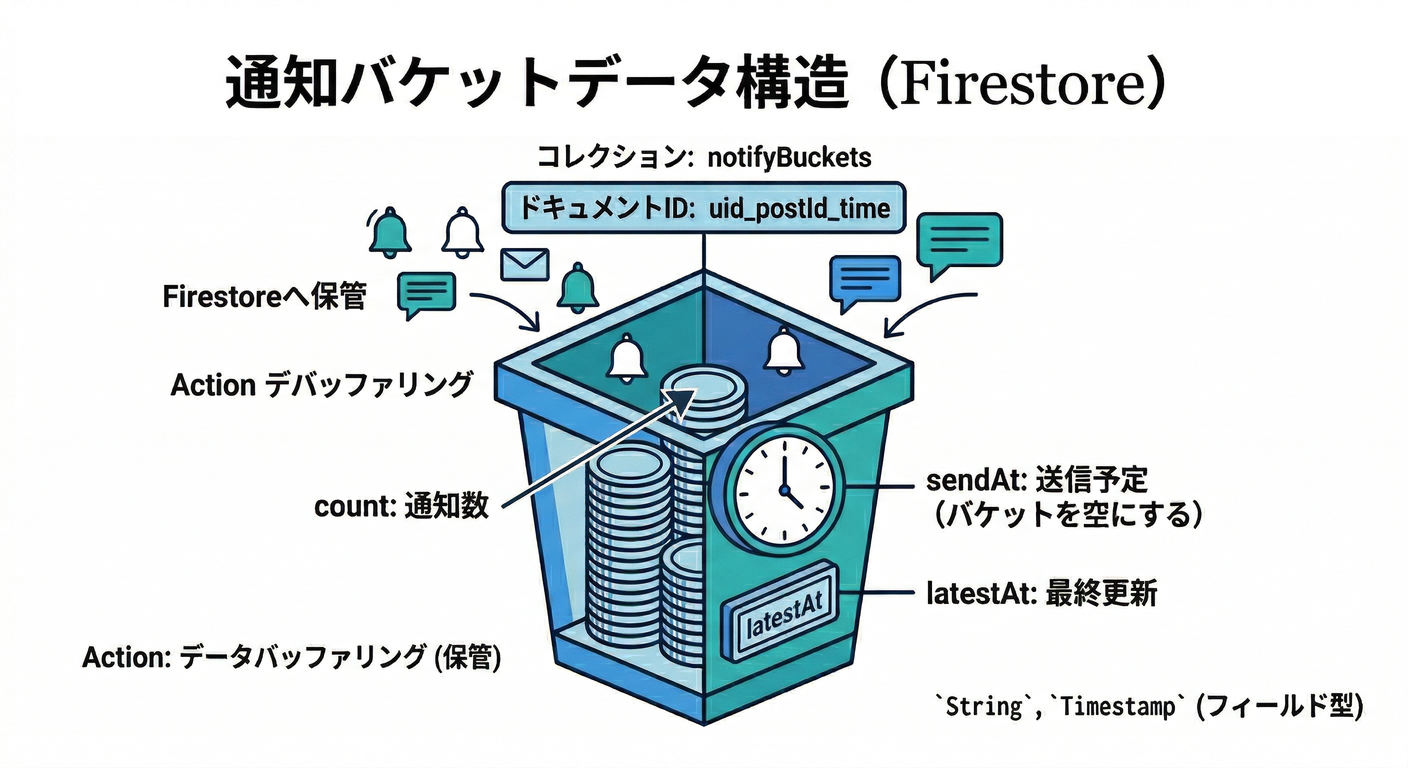
手順1:Firestoreに“まとめ箱(バケツ)”を作る🪣🗃️
例:コレクション notifyBuckets に、送信待ちのまとめを置きます。
uid:送る相手postId:どの投稿のコメントかcount:何件まとまった?latestAt:最新コメント時刻sendAt:いつ送る?(バケツの締め切り)sentAt:送ったら入れる(重複送信防止)
手順2:コメント作成トリガーで、バケツに積む🧺➕
(第14章の「コメント作成→通知」の入口に、“すぐ送らない”分岐を入れる感じです)
import { initializeApp } from "firebase-admin/app";
import { getFirestore, FieldValue, Timestamp } from "firebase-admin/firestore";
import { onDocumentCreated } from "firebase-functions/v2/firestore";

initializeApp();
const db = getFirestore();

const WINDOW_MS = 2 * 60_000; // 2分まとめ

function bucketKey(uid: string, postId: string, createdAtMs: number) {
  const bucketStart = Math.floor(createdAtMs / WINDOW_MS) * WINDOW_MS;
  return {
    id: `${uid}_${postId}_${bucketStart}`,   // "/"を避ける
    sendAtMs: bucketStart + WINDOW_MS,      // ウィンドウ終了で送る
  };
}

export const onCommentCreated = onDocumentCreated(
  "posts/{postId}/comments/{commentId}",
  async (event) => {
    const postId = event.params.postId as string;
    const data = event.data?.data();
    if (!data) return;

    const targetUid = data.postOwnerUid as string; // 例:投稿者に送る
    const actorUid = data.authorUid as string;     // 例:コメントした人
    if (!targetUid || !actorUid) return;

    // 自分の投稿に自分でコメント→通知しない(第14章ルール)
    if (targetUid === actorUid) return;

    const createdAt = data.createdAt?.toDate?.() ? data.createdAt.toDate() : new Date();
    const { id, sendAtMs } = bucketKey(targetUid, postId, createdAt.getTime());

    const ref = db.collection("notifyBuckets").doc(id);

    await db.runTransaction(async (tx) => {
      const snap = await tx.get(ref);
      const base = {
        uid: targetUid,
        postId,
        sendAt: Timestamp.fromMillis(sendAtMs),
        latestAt: Timestamp.fromDate(createdAt),
      };

      if (!snap.exists) {
        tx.set(ref, {
          ...base,
          count: 1,
          sentAt: null,
          createdAt: FieldValue.serverTimestamp(),
          updatedAt: FieldValue.serverTimestamp(),
        });
      } else {
        tx.update(ref, {
          ...base,
          count: FieldValue.increment(1),
          updatedAt: FieldValue.serverTimestamp(),
        });
      }
    });
  }
);
ポイント👀✨
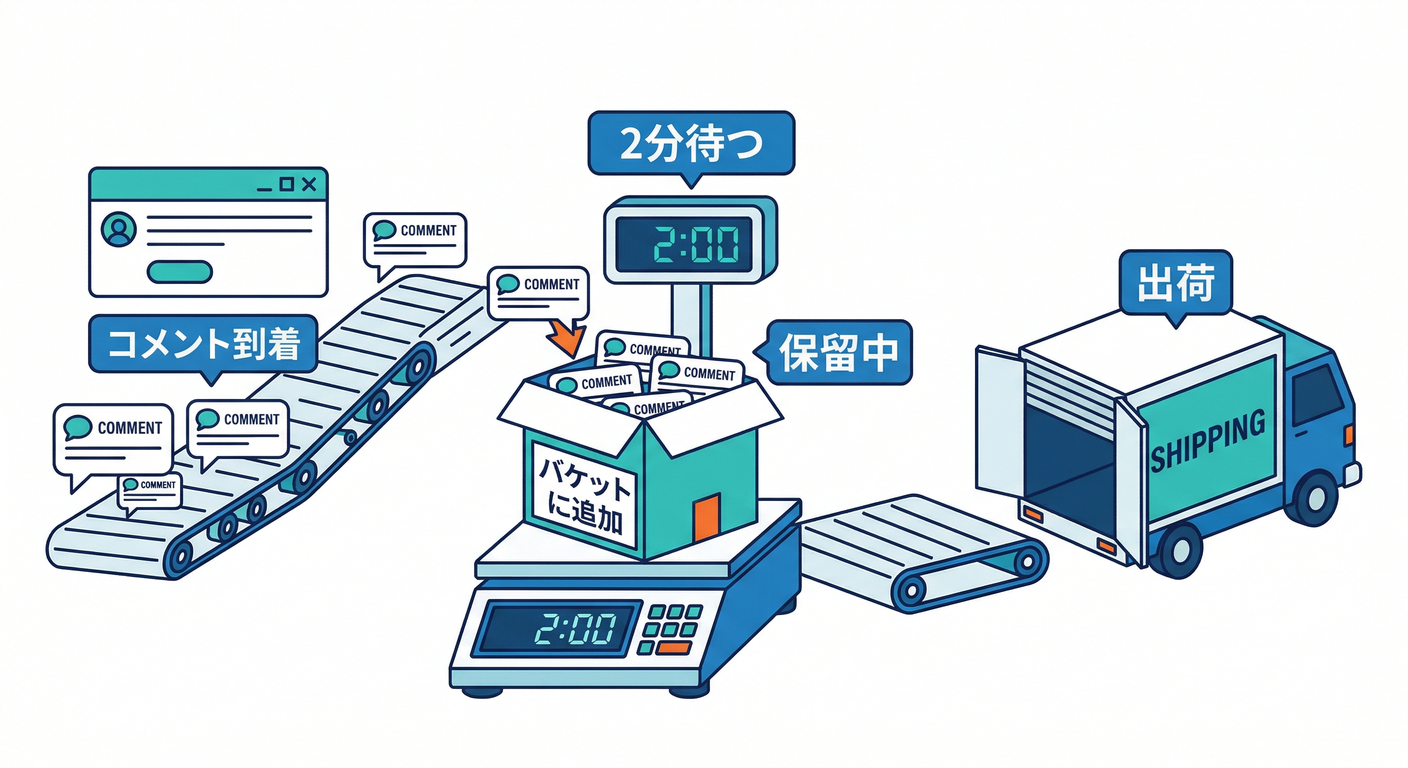
- **“すぐ送らない”**で、まず箱に積む
sentAtで 二重送信を防ぐ(超大事)🧯
手順3:スケジュール関数で、期限が来た箱だけ送る📤⏱️
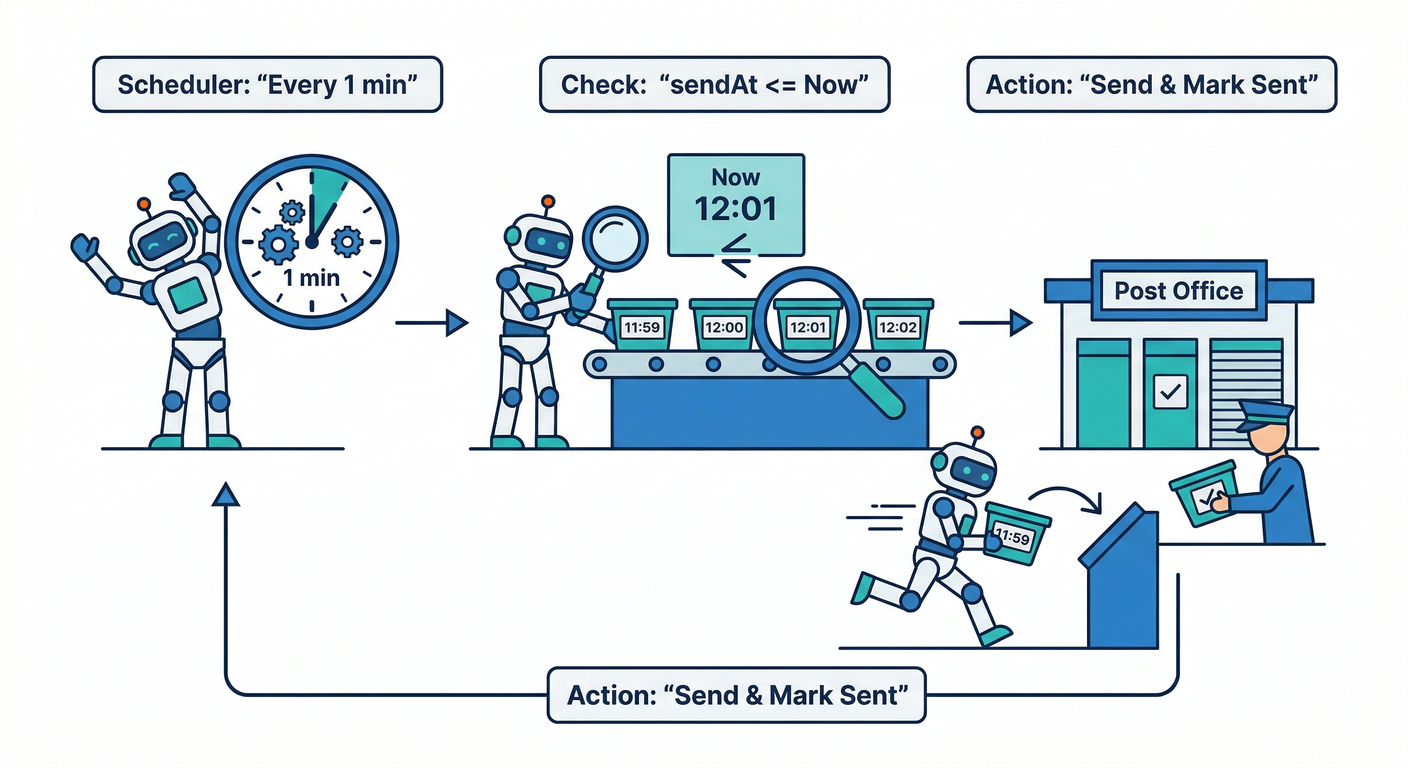
送るときに、TTL(24h) と 上書きキー(collapseKey / tag) を付けます。
- TTL:古い通知は届かなくてOK(Webは
webpush.headers.TTL、iOSはapns-expiration、Androidはandroid.ttl)(Firebase) - collapseKey:Androidで“最新だけ”寄せる(最大4種類まで)(Firebase)
- tag:通知枠を置き換える(Android / Web)(Firebase)
import { getMessaging } from "firebase-admin/messaging";
import { onSchedule } from "firebase-functions/v2/scheduler";

const messaging = getMessaging();

const TTL_SEC = 24 * 60 * 60;
const TTL_MS  = TTL_SEC * 1000;

async function getUserTokens(uid: string): Promise<string[]> {
  const snap = await db.collection("users").doc(uid).collection("fcmTokens").get();
  return snap.docs.map(d => d.id); // 例:docIdをtokenにしてる設計
}

export const sendDueDigests = onSchedule("every 1 minutes", async () => {
  const now = Timestamp.now();

  const dueSnap = await db.collection("notifyBuckets")
    .where("sentAt", "==", null)
    .where("sendAt", "<=", now)
    .limit(50)
    .get();

  for (const doc of dueSnap.docs) {
    const b = doc.data() as any;
    const uid = b.uid as string;
    const postId = b.postId as string;
    const count = Number(b.count ?? 0);
    if (!uid || !postId || count <= 0) {
      await doc.ref.update({ sentAt: FieldValue.serverTimestamp(), note: "skip:invalid" });
      continue;
    }

    const tokens = await getUserTokens(uid);
    if (tokens.length === 0) {
      await doc.ref.update({ sentAt: FieldValue.serverTimestamp(), note: "skip:no_tokens" });
      continue;
    }

    // “同じ枠で上書き”用のキー(ユーザー×投稿単位)
    const key = `comment_${uid}_${postId}`;

    // ざっくり本文(第18章でAI整形に進化させると最高🤖✨)
    const title = "新しいコメント";
    const body  = count === 1 ? "コメントが1件届きました" : `コメントが${count}件届きました`;

    // iOS向けの期限(秒のUNIX時刻)※FCMの一次情報でも言及あり:contentReference[oaicite:8]{index=8}
    const apnsExpiration = String(Math.floor(Date.now() / 1000) + TTL_SEC);

    const message = {
      tokens,
      notification: { title, body },
      data: {
        postId,
        // クリック後に飛ばしたい場所(WebはSW側で解釈して遷移でもOK)
        path: `/posts/${postId}#comments`,
        bucketId: doc.id,
      },

      // Android:ttl(ms) + collapseKey + tag
      android: {
        ttl: TTL_MS,                  // Admin SDKはmsで指定できる:contentReference[oaicite:9]{index=9}
        collapseKey: key,             // 最大4種類までに抑える:contentReference[oaicite:10]{index=10}
        notification: {
          tag: key,                   // 同じ通知枠を置き換える:contentReference[oaicite:11]{index=11}
          notificationCount: count,   // バッジっぽく使える:contentReference[oaicite:12]{index=12}
        },
      },

      // Web Push:TTLヘッダ + tag(通知枠を置き換え)
      webpush: {
        headers: {
          TTL: String(TTL_SEC),       // WebはTTLヘッダで期限設定:contentReference[oaicite:13]{index=13}
        },
        notification: {
          tag: key,                   // tag/renotify などが使える
          renotify: false,
        },
        fcmOptions: {
          link: `/posts/${postId}#comments`,
        },
      },

      // iOS:apns-expiration で期限(TTL相当)
      apns: {
        headers: {
          "apns-expiration": apnsExpiration, // iOSはこのヘッダで期限:contentReference[oaicite:15]{index=15}
        },
      },
    };

    const res = await messaging.sendEachForMulticast(message as any);

    await doc.ref.update({
      sentAt: FieldValue.serverTimestamp(),
      successCount: res.successCount,
      failureCount: res.failureCount,
    });
  }
});
✅ これで起きること
- コメントが連投されても 2分に1通🧺
- 古い通知は 24時間で自然消滅⏰(Firebase)
🔥ミニ課題:AIで“まとめ通知の文面”を賢くする🤖📝
今の body は固定文でした。ここを「2分間の出来事」から短文生成に変えると一気にプロっぽいです😎✨
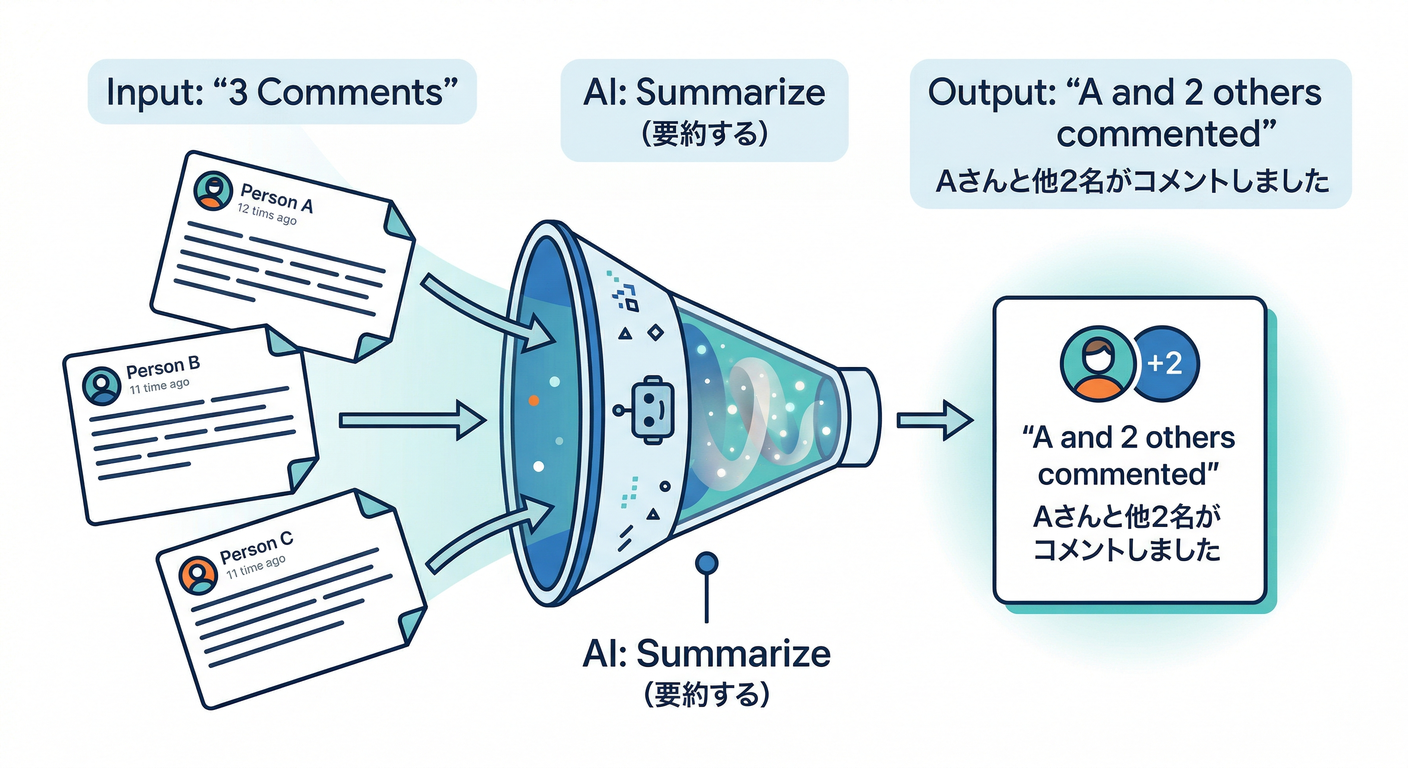
例)
- 1件 →「Aさんがコメントしました」
- 5件 →「Aさんほか4件の新着コメントがあります」
- 深夜帯 →「朝にまとめて通知(送らない)」←第19章にもつながる💡
ここで Google の Firebase AI系を絡めるなら、通知文生成は相性◎です👇 Firebase AI Logic はアプリから Gemini/Imagen を呼ぶための仕組みや、App Check連携なども整理されています(Firebase)
さらに開発体験として、Gemini CLI×Firebase拡張で、セットアップやコード差し込みまでエージェント寄りに進める流れも公式に出ています(/firebase:init など)(The Firebase Blog)
✅チェック(理解確認)🧠✅
- 「まとめる」「間引く」「TTL」それぞれ、何を減らす作戦?🧩
- Androidの
collapseKeyを増やしすぎると、何が起きそう?(最大4種類)📱(Firebase) - Web PushでTTLを付ける場所はどこ?(ヘッダ)🌐(Firebase)
おまけ:将来の拡張ネタ(第17章へ橋渡し)🌉🧹
送信結果 failureCount が出たら、次はこう進化できます👇
- 無効トークン掃除(運用で効く)🧹
- エラー理由で分岐(APNs/権限/削除済みなど)🧯
この続きが **第17章の“健康診断”**に直結します💪✨